Title:
Auto-Save for Article and Comment Forms
Computer crashes, network interruptions and accidently closed browser windows are inevitable. They're all are costly when you lose valuable work in your browser!
The Auto-Save feature in
Publishing
,
Editing
and
Comment
forms save the day.
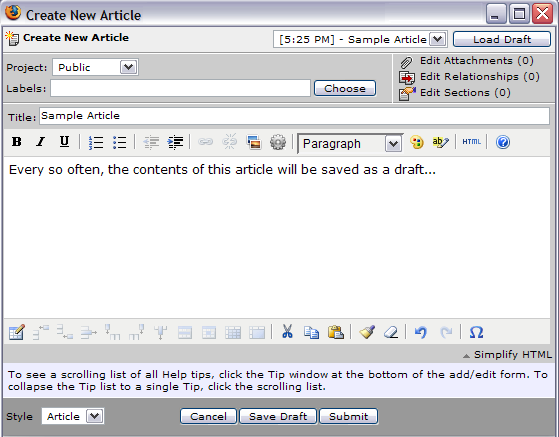
At a configurable time interval, your work in progress is saved to the TeamPage server and can be easily restored from the auto-save draft.
In the example below, you can see the "Sample Article" was auto-saved last at 5:25.
When you return to a page where you were editing a comment, a dialogue will prompt you to re-load the comment an continue from where you left off.
Attachments:
AutoSave.png
Related Articles
referenced by
(5)
Press173
:
New Plug-In Architecture Enables Traction Users to Easily Develop, Manage and Share TeamPage Extensions
Press172
:
26 March 2007 | Traction Announces Free 5 User Version, New Plug-In Architecture for Developers, and Release 3.7.3
Product27
:
Comments and Threaded Discussions
Product22
:
Editing
Product15
:
Publishing
references
(3)
Product27
:
Comments and Threaded Discussions
Product22
:
Editing
Product15
:
Publishing
Article: Product318 (
permalink
)
Categories: :Public:feature
Date: March 23, 2007; 5:32:21 PM Eastern Standard Time
Author Name: Jordan Frank
Author ID: jfrank